
Picking an ai prototype generator in 2025 sounds like a simple shopping problem. You compare features, skim a few screenshots, call it a day.
Then real life shows up.



Someone asks for a demo link by tomorrow. A teammate wants to “just click it like a real app.” A stakeholder doesn’t care about your tidy frames—they want to feel the flow. And suddenly the decision isn’t “which tool draws better screens?”
It’s this: what kind of prototype do you mean?
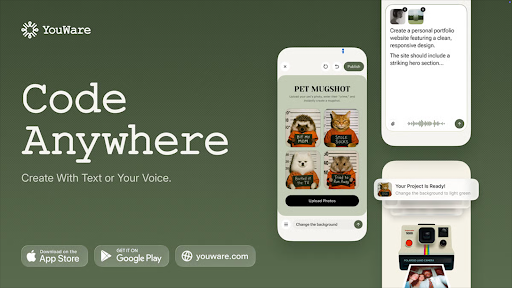
YouWare comes from the other direction. You describe the product in plain English, and it generates an interactive project you can publish as a shareable URL—closer to “software you can try” than “screens you can click.”
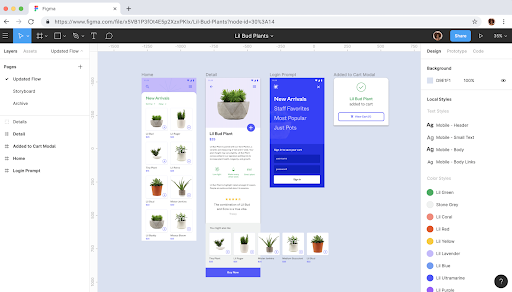
Figma lives in a design-first world. Your prototype is a set of frames stitched together with interactions—clean, controllable, and easy to review inside a design system. Figma’s prototyping even supports multiple flows, so teams can test different entry points without building separate files.
So yeah, this is a comparison. But it’s also a small identity crisis: are you prototyping design, or prototyping a product?
Two prototypes that look similar… until you share them
A Figma prototype usually lives inside the design file. You connect frames, add transitions, build overlays for menus and dialogs, and play the flow. It’s excellent when the goal is alignment: “Is this the right layout? Is this the right interaction? Does this match our system?”
A YouWare prototype behaves like a tiny app. You can send someone a link and watch them poke at it like they would a real product demo. That changes the vibe in a meeting. People stop debating pixel spacing and start asking better questions—why the login comes first, what happens if the list is empty, whether the “Add” button needs to be everywhere.
If you’ve ever tried to convince non-designers that a clickable prototype inside a design tool is “basically the same thing,” you already know where this is going.



The “in a hurry” answer
If your team already runs on design files, components, and tight UI governance, Figma still makes the most sense. It’s the place where craft lives. It’s also the place where many teams store truth.
If you want a prompt → working prototype → publish → share, and you want a realistic path to turning that prototype into a real app later, YouWare is the sharper pick. It’s built for momentum. And momentum is what most projects lack.
That’s the headline. Now let’s talk about why the two tools feel so different in practice.
What an “AI prototype generator” actually means in 2025
The phrase ai prototype generator gets thrown around like it’s one category. It isn’t.
Some tools use AI to accelerate design work—help you start faster, tidy layouts, generate copy, remix ideas. You still do the heavy lifting inside a design-centered workflow.
Other tools use AI as the build engine. You describe the product, the tool produces something interactive, and you iterate on behavior as much as visuals.
Neither approach is “better” in the abstract. But if your prototype needs to behave like software (even a little), the second category hits differently.
And if you’re reading this because you need a demo link, not a design file… well, you already know which category you’re shopping in.
YouWare: when prototyping starts to feel unfair
YouWare’s core loop is simple: tell it what you want, get a working prototype, edit it fast, publish it.
Here’s the part I like: YouWare doesn’t treat editing as a punishment for using AI. It expects you to refine the output. You can weak UI directly on the canvas with Visual Editing, then use Boost to clean up the overall look—type, spacing, layout energy—without babysitting every detail.
You also get a more forgiving iteration cycle. When generation goes sideways (and it will, sometimes), YouWare leans on “safety net” mechanics like Auto-fix and Credit Care, so experimentation doesn’t feel like burning money.
And then there’s the part most prototype tools dodge: backend.
Prototypes rarely stay “just prototypes.” Someone asks for login. Someone wants saved data. Someone suggests payments “as a stretch goal,” which is how stretch goals become deadlines. YouWare’s YouBase positioning—built-in backend modules and a “no cloud tax” story—fits that reality. You’re not forced to rebuild everything the moment your prototype grows teeth.
If your prototype might graduate into a real product, YouWare gives you a runway instead of a cliff.
Figma: still the cleanest place to craft UI
Figma remains the best answer when you need tight control. Components, variants, design systems, team libraries—this is its native language.
Its prototyping model is also mature. You build flows and entry points (useful when you have multiple journeys to test), connect interactions, layer overlays, and share the prototype for review.
And if your workflow depends on designer-to-developer handoff, Figma keeps investing there. Dev Mode access also ties into seat types and billing, which matters more than people like to admit—especially once a team grows.
One nuance worth knowing: Figma has been pushing deeper into AI-assisted creation. Figma Make, for example, moves toward prompt-to-app style building inside the Figma ecosystem, with publishing access depending on plan/seat tier.
That’s interesting. It’s also a signal: even Figma recognizes that “design-only prototypes” don’t cover every modern workflow anymore.
Still, Figma’s center of gravity stays design-first. If your prototype is mainly about UI fidelity and stakeholder review, it’s hard to beat.
Editing and iteration: pixel authority vs speed-to-demo
This is where the personality difference shows.
Figma gives you authority. Every pixel behaves. Your design system stays consistent. You can zoom in, obsess, and polish until the UI feels inevitable.
YouWare gives you pace. You can get to a convincing demo faster, then refine what matters. It’s less “perfect the artifact” and more “ship the story.”
So ask yourself a slightly uncomfortable question: do you need precision, or do you need progress? Most teams say “both,” but deadlines usually pick one for you.
Sharing and collaboration: file culture vs link culture
Figma collaboration feels like a workspace: designers, PMs, devs, everyone in the same file universe. It’s excellent when your team already lives there.
YouWare collaboration feels more like shipping mini-products. You publish, share a URL, and collect reactions the way people react to software—by using it. You can also control sharing (public, private, password-protected) and lean into remix/co-creation patterns if you want multiple variations fast.
If your audience is an internal design review, Figma fits.
If your audience is “someone who just wants to click it,” YouWare fits.
Cost and scaling: the quiet math nobody wants to do
Figma’s model is seat-based, and it has updated pricing, seats, and billing workflows starting March 11, 2025, including a distinct Dev seat for Dev Mode access on certain plans.
That can be totally fine—until it isn’t. Seat math becomes a real conversation once more people need access.
YouWare’s pitch is different: keep costs predictable, avoid surprise infrastructure bills, and don’t pay a separate “backend tax” the moment your prototype becomes useful. That framing lands best with founders, side hustlers, or small teams who don’t want to turn “prototype” into “new monthly bill.”
So… which one should you pick?
If you need a polished UI prototype built from an existing system, and your team already lives in design files, pick Figma. You’ll move faster than you think because the ecosystem is familiar.
If you need a prototype that behaves like a real product—something you can publish, share, and potentially evolve into an app—pick YouWare. It compresses the path from idea to demo, and it doesn’t punish you when “just a prototype” starts needing real functionality.
Maybe the simplest way to put it:
Figma helps you present an idea beautifully.
YouWare helps you prove an idea quickly.